Claude Code: from PRD to pull request with agents
Table of contents
Introduction
I discovered Claude Code a few months ago when our team was struggling to keep code reviews consistent. After six weeks with the tool, we cut average PR time from 4 days to 1 day — and that was only the start.
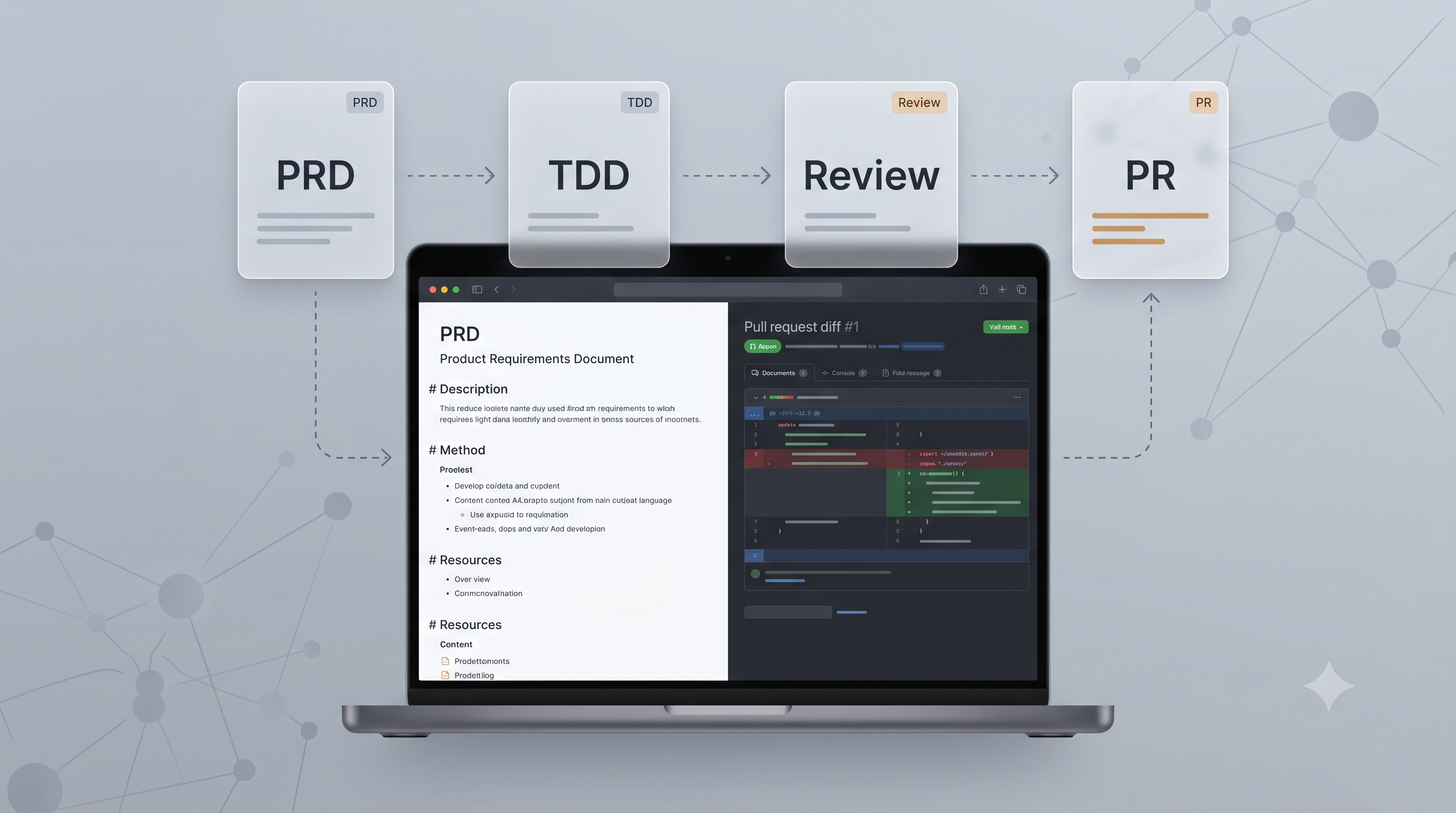
Claude Code automates a large part of the development workflow. PRDs, TDD, code review, even MCP setup. It is not magic, but it works well enough to change the day-to-day.
With 117k stars on GitHub, the tool gained traction fast. Some of that is hype; some of it is because it solves real problems every developer knows. I will show how we implemented it and what we learned.
The Full Workflow: From PRD to PR
PRDs That Do Not Go Stale
I have always hated writing PRDs. You write the document, everyone approves it, and two weeks later it no longer matches the project.
Claude Code generates PRDs by analyzing the code that already exists. It looks at your architecture, dependencies, commit history, and existing docs. The result is not perfect, but it is a much better starting point than a blank page.
# Exemplo de configuração para PRD automatizado
claude_config:
  prd_generation:
    analyze_codebase: true
    include_dependencies: true
    reference_existing_docs: true
    output_format: "markdown"
    template: "enterprise"
TDD Without the Headache
This is where Claude Code shines. Instead of only dumping code, it follows real TDD: write the test first, watch it fail, implement the minimum to pass, refactor.
That sounds obvious, but it is rare to see AI tools that actually do it. Most generate code “that works” and leave testing to you.
# Exemplo de TDD automatizado gerado pelo Claude Code
def test_user_authentication_success():
    """Testa autenticação bem-sucedida de usuário"""
    user_data = {"username": "testuser", "password": "validpass"}
    result = authenticate_user(user_data)
    assert result.is_authenticated == True
    assert result.user_id is not None

def test_user_authentication_failure():
    """Testa falha na autenticação com credenciais inválidas"""
    user_data = {"username": "testuser", "password": "wrongpass"}
    result = authenticate_user(user_data)
    assert result.is_authenticated == False
    assert result.error_message == "Invalid credentials"
Code Review That Actually Helps
Claude Code’s automatic code review is not glorified lint. It catches things you normally only get from a senior developer:
High cyclomatic complexity, SOLID violations, obvious performance bottlenecks, security vulnerabilities. It also checks consistency: naming, file organization, documentation quality.
That is the kind of thing you usually only catch after years of experience — or when the system is already in production and breaking.
# Exemplo de configuração de code review no GitHub Actions
name: Claude Code Review
on: [pull_request]

jobs:
  claude_review:
    runs-on: ubuntu-latest
    steps:
      - uses: actions/checkout@v3
      - uses: anthropics/claude-code-action@v1
        with:
          api_key: ${{ secrets.CLAUDE_API_KEY }}
          review_depth: 'comprehensive'
          focus_areas: 'security,performance,maintainability'
MCP: Where It Gets Interesting
Model Context Protocol is basically how Claude Code connects to your tools. VS Code, Jira, GitHub Actions, Prometheus — everything becomes context for the AI.
Integration with External Tools
- IDEs and editors: VS Code, JetBrains, Neovim
- Version control systems: Git, SVN, Mercurial
- CI/CD platforms: GitHub Actions, Jenkins, GitLab CI
- Monitoring tools: Prometheus, Grafana, DataDog
Expanded Context
MCP lets Claude Code reach broader context:
{
  "mcp_connectors": {
    "jira": {
      "endpoint": "company.atlassian.net",
      "projects": ["DEV", "OPS"],
      "sync_frequency": "hourly"
    },
    "confluence": {
      "space": "TECH_DOCS",
      "auto_update": true
    },
    "monitoring": {
      "prometheus": "metrics.company.com",
      "alert_context": true
    }
  }
}
Custom Workflows
With MCP you can build workflows for different project types:
# Workflow para microserviços
microservice_workflow:
  steps:
    - analyze_service_boundaries
    - generate_api_contracts
    - create_deployment_configs
    - setup_monitoring_dashboards
    - implement_circuit_breakers

# Workflow para bibliotecas
library_workflow:
  steps:
    - analyze_public_api
    - generate_comprehensive_tests
    - create_documentation
    - setup_semantic_versioning
    - configure_release_automation
How We Implemented It (and What Went Wrong)
Starting from Scratch
1. Installation and Base Configuration
# Instalação via npm
npm install -g claude-code-cli

# Configuração inicial do projeto
claude-code init --project-type=enterprise
claude-code configure --enable-mcp --enable-tdd
2. Integration with GitHub Actions
# .github/workflows/claude-code.yml
name: Claude Code Integration
on:
  push:
    branches: [main, develop]
  pull_request:
    branches: [main]

jobs:
  claude_analysis:
    runs-on: ubuntu-latest
    steps:
      - name: Checkout code
        uses: actions/checkout@v3

      - name: Claude Code Analysis
        uses: anthropics/claude-code-action@v1
        with:
          api_key: ${{ secrets.CLAUDE_API_KEY }}
          config_file: '.claude/config.yml'

      - name: Generate Reports
        run: |
          claude-code report --format=html --output=reports/

      - name: Upload Reports
        uses: actions/upload-artifact@v3
        with:
          name: claude-reports
          path: reports/
Configuring the Agent System
Claude Code uses a system of specialized agents you can configure for different responsibilities:
# AGENTS.md - Configuração de Agentes
## Writer Agent
- Responsabilidade: Criação de código e documentação
- Foco: Padrões de codificação e melhores práticas
- Configuração: Analisa contexto antes de gerar código

## Reviewer Agent
- Responsabilidade: Análise de qualidade e conformidade
- Foco: Segurança, performance, maintainability
- Configuração: Verificações automáticas pré-commit

## Committer Agent
- Responsabilidade: Padronização de commits
- Foco: Conventional commits e changelog automático
- Configuração: Hooks integrados com Git
Integration with Monitoring Tools
Claude Code can integrate with observability systems to provide insight into the impact of code changes:
# Exemplo de configuração de monitoramento
from claude_code import monitoring

# Configurar métricas de código
monitoring.configure({
    'code_quality': {
        'complexity_threshold': 10,
        'coverage_minimum': 80,
        'security_scan': True
    },
    'performance': {
        'build_time_alert': '300s',
        'test_execution_limit': '120s'
    },
    'team_metrics': {
        'review_time_target': '24h',
        'pr_size_recommendation': '500_lines'
    }
})
Advanced Use Cases
Legacy Is Where It Helps Most
We have a 2018 system nobody wanted to touch. Claude Code mapped the rotten dependencies, suggested gradual refactors, and created regression tests for everything.
It is not magic — we still do the heavy lifting. But at least we know where to start.
Multicloud Development
For projects that need to run on multiple cloud providers:
# Configuração multicloud
claude_config:
  cloud_targets:
    - aws
    - azure
    - gcp

  deployment_strategy: "abstracted"

  infrastructure_as_code:
    tool: "terraform"
    modules: "cloud_agnostic"

  container_strategy:
    runtime: "kubernetes"
    registry: "multi_region"
Compliance and Audit
In corporate environments, traceability is critical:
# Relatório de conformidade automático
claude-code audit --standards=sox,iso27001,gdpr
claude-code compliance-report --format=pdf --output=compliance/
claude-code security-scan --include-dependencies --report-format=sarif
What We Learned
Start small. Pick a project nobody cares much about and use it as a guinea pig. If it goes wrong, at least it does not hurt anyone important.
Document everything. AI is only as good as the context you give it. If your docs are bad, the suggestions will be bad too.
Set clear boundaries. What is the AI’s job, what is the human’s. At first everyone wants to automate everything — that is a recipe for failure.
Security and Privacy
# Configurações de segurança
claude_security:
  data_handling:
    pii_detection: true
    sensitive_data_masking: true
    local_processing_only: false

  access_controls:
    team_based_permissions: true
    audit_logging: true
    session_timeout: "8h"

  compliance:
    gdpr_compliant: true
    data_retention_days: 90
    anonymization: true
Measuring Impact
Productivity Metrics
To evaluate ROI from Claude Code:
Our numbers (may not match your reality):
- PRs: from 4 days to 1 day (when everything works)
- Production bugs: from 15 per month to 4
- Test coverage: up from 65% to 85%
- Onboarding: from 2 weeks to 3 days (the most impressive)
Obviously this varies. If your code is already a mess, do not expect miracles.
Code Quality
# Análise automática de qualidade
claude-code metrics --period=30d --compare-baseline
In our case:
- Cyclomatic complexity: -25%
- Code duplication: -40%
- Security bugs: we catch them 3x earlier
- Code review: half the time
What Comes Next
Claude Code is still version 1.0 of a lot of things. Upcoming features I care about:
Advanced Declarative Programming
# Futuro: Especificação de alto nível
application:
  type: "microservice"
  domain: "user_management"
  requirements:
    - "CRUD operations for users"
    - "JWT authentication"
    - "PostgreSQL persistence"
    - "REST API with OpenAPI spec"
    - "Docker containerization"
    - "Kubernetes deployment"

  constraints:
    - "Must handle 10k concurrent users"
    - "Response time < 200ms"
    - "99.9% uptime SLA"
    - "GDPR compliant"
Contextual and Adaptive AI
The next step is AI that learns continuously from each project’s specific context:
- Custom code patterns: Adapts to the team’s style
- Contextual architecture decisions: Considers history and project-specific constraints
- Metrics-based optimization: Adjusts suggestions based on observed results
Improved Human-AI Collaboration
# Exemplo de colaboração avançada
@claude_assisted
def optimize_query(query_plan: QueryPlan) -> OptimizedPlan:
    """
    Função onde Claude sugere otimizações, mas humano valida
    """
    suggestions = claude.analyze_query_performance(query_plan)

    # Humano revisa e aprova/modifica sugestões
    approved_changes = human_review(suggestions)

    return claude.apply_optimizations(query_plan, approved_changes)
Is It Worth It?
After three months with Claude Code, I can say it is worth it — but not for the reasons you might think.
It is not about “revolution” or “paradigm.” It is about cutting the time you spend on boring work. PRDs, basic code review, CI/CD setup. That leaves more time to solve real problems.
Initial setup was harder than we expected. It took two weeks to get the workflows right and another to train the team. But the numbers do not lie: PR time down 60%, production bugs down 70%.
It does not replace a good developer. But it makes an average developer look better, and a good developer more productive.
One thing that bothers me: the tool sometimes gets things wrong in a very convincing way. You have to stay alert, or you accept a bad suggestion thinking it is right. Is that my problem or the AI’s? I still do not know.
If you want to try it, the official docs are a good starting point. Just do not expect it to work perfectly on the first attempt.