Jenkins CasC: high-performance pipelines with GitOps
Table of contents

The Need to Evolve: Challenges of “Basic” Jenkins
Jenkins is one of the most powerful and popular automation servers in the world. It drives countless CI/CD pipelines that build, test, and deploy applications. Managed only through the web UI — what many call “ClickOps” — it shows its weak spots.
ClickOps creates problems that hurt agility and reliability on any project, especially in complex MLOps environments:
- No versioning or audit trail: Who changed a job config? Why? Without version control those questions are almost impossible to answer. Rolling back a bad change becomes a manual treasure hunt.
- Inconsistency and hard reproducibility: Cloning a Jenkins environment for development, staging, or disaster recovery is painful and error-prone. Small config drifts between environments cause unexpected failures.
- Painful scale and maintenance: Managing dozens or hundreds of jobs by hand does not scale. Maintenance becomes a bottleneck, and consistency across projects stays out of reach.
To get the reliability, speed, scale, and security modern projects need, you have to go beyond the basics.
Key Technologies and Concepts
Jenkins is an open-source automation tool written in Java that makes continuous integration and continuous delivery (CI/CD) practical for projects of any size. Originally created as “Hudson” in 2004 by Kohsuke Kawaguchi at Sun Microsystems, Jenkins grew into the world’s most popular automation server, with more than 300,000 active installations and a lively community of developers and users.
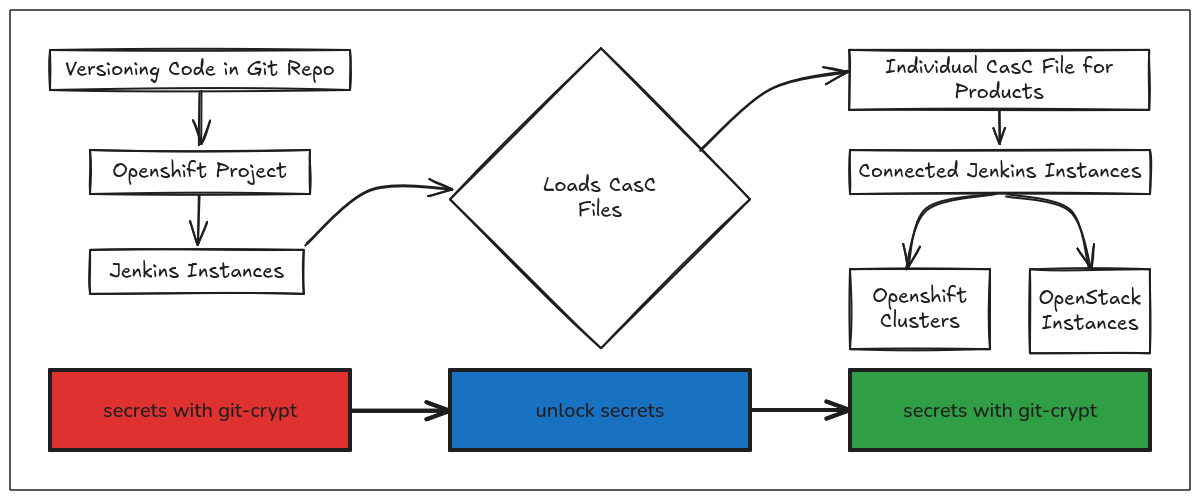
Configuration as Code (CasC) is a fundamental shift in how we manage Jenkins infrastructure. You define the full Jenkins configuration — plugins, jobs, credentials, and system settings — in versioned YAML files. The JCasC (Jenkins Configuration as Code) plugin removes the need for manual UI configuration and brings reproducibility, auditability, and easier maintenance to complex environments.
GitOps is an operating model that uses Git as the single source of truth for infrastructure and application configuration. In a Jenkins context, GitOps means every config change goes through a Pull Request flow with code review, automated tests, and controlled deployment. The desired system state stays in sync with what is declared in Git, creating a reliable feedback loop for infrastructure operations.
GitFlow and Distributed Teams: Scaling Collaboration
When we talk about high-performance pipelines in enterprise environments, we cannot ignore distributed teams and the need for organized workflows. That is where GitFlow becomes essential for managing both application code and Jenkins configuration.
GitFlow: Organizing Development
GitFlow is a branching model that assigns clear roles to different branch types:
- main/master: Production code, always stable
- develop: Integration branch for new features
- feature/*: Branches for specific feature work
- release/*: Release preparation
- hotfix/*: Urgent production fixes
With CasC, we apply the same model to Jenkins configuration:
# feature/new-python-pipeline
jenkins:
  jobs:
    - script: |
        pipelineJob('python-ml-pipeline') {
          definition {
            cpsScm {
              scm {
                git('https://github.com/team/ml-project.git')
              }
              scriptPath('Jenkinsfile')
            }
          }
        }
Challenges of Distributed Teams
Distributed teams face unique problems that CasC helps solve:
Different time zones: With configuration as code, changes can apply automatically without synchronous coordination across teams.
Inconsistent local environments: Each developer can run a local Jenkins instance identical to production, ending the classic “works on my machine” problem.
Tribal knowledge: Documenting configuration in code removes dependence on a few individuals and creates transparency for a global team.
Strategies for Effective Collaboration
Pull Request gates: Require approvals across time zones:
# .github/CODEOWNERS
*.yaml @team-lead-americas @team-lead-europe @team-lead-asia
Async communication: Use detailed PRs as the communication channel — explain not only the “what” but the “why” of configuration changes.
Automated rollback: Configure pipelines that detect failures and roll back to the last stable configuration — essential when you do not have 24/7 coverage.
Jobs DSL: Programming Pipelines Declaratively
A core piece of the Jenkins ecosystem for automation at scale is the Jobs DSL Plugin. While CasC manages Jenkins system configuration, Jobs DSL lets you define and manage jobs programmatically with a Groovy-based DSL.
Why Jobs DSL matters
Instead of creating dozens of jobs by hand in the UI, Jobs DSL lets you:
- Generate jobs in bulk: Create many similar jobs with small variations
- Enforce standards automatically: Keep every job on the same conventions
- Simplify maintenance: Change a template and regenerate derived jobs
- Integrate with CasC: Combine system configuration with job definitions
Practical example: Pipeline for multiple projects
// Definindo uma lista de projetos de machine learning
def mlProjects = [
  [name: 'customer-churn', repo: 'ml-customer-churn', pythonVersion: '3.9'],
  [name: 'fraud-detection', repo: 'ml-fraud-detection', pythonVersion: '3.8'],
  [name: 'recommendation-engine', repo: 'ml-recommendations', pythonVersion: '3.10']
]

// Gerando um pipeline para cada projeto
mlProjects.each { project ->
  pipelineJob("ml-pipeline-${project.name}") {
    description("Pipeline automatizado para ${project.name}")

    definition {
      cpsScm {
        scm {
          git {
            remote {
              url("https://github.com/company/${project.repo}.git")
              credentials('github-token')
            }
            branches('*/main')
          }
        }
        scriptPath('Jenkinsfile')
      }
    }

    properties {
      buildDiscarder {
        logRotator {
          numToKeepStr('10')
          artifactNumToKeepStr('5')
        }
      }
    }

    parameters {
      stringParam('PYTHON_VERSION', project.pythonVersion, 'Versão do Python para o projeto')
      booleanParam('DEPLOY_TO_STAGING', false, 'Deploy automático para staging?')
    }

    triggers {
      githubPush()
      cron('@daily') // Build diário para verificar dependências
    }
  }
}
Integrating Jobs DSL with CasC
Jobs DSL can be configured through CasC for a fully automated flow:
# jenkins.yaml - Configuração CasC
jenkins:
  systemMessage: "Jenkins com CasC + Jobs DSL"

jobs:
  - script: >
    folder('ml-pipelines') {
      displayName('ML Pipelines')
      description('Pipelines automatizados para projetos de Machine Learning')
    }
  - script: >
    pipelineJob('ml-pipelines/model-training-template') {
      definition {
        cps {
          script('''
            pipeline {
              agent any
              parameters {
                choice(choices: ['xgboost', 'random-forest', 'neural-network'],
                   name: 'MODEL_TYPE')
                string(name: 'DATASET_VERSION', defaultValue: 'latest')
              }
              stages {
                stage('Data Validation') {
                  steps {
                    sh 'python scripts/validate_data.py'
                  }
                }
                stage('Model Training') {
                  steps {
                    sh "python scripts/train_${params.MODEL_TYPE}.py"
                  }
                }
                stage('Model Evaluation') {
                  steps {
                    sh 'python scripts/evaluate_model.py'
                    publishHTML([
                      allowMissing: false,
                      alwaysLinkToLastBuild: true,
                      keepAll: true,
                      reportDir: 'reports',
                      reportFiles: 'model_metrics.html',
                      reportName: 'Model Metrics'
                    ])
                  }
                }
              }
              post {
                always {
                  archiveArtifacts artifacts: 'models/**', fingerprint: true
                  junit 'test-results.xml'
                }
              }
            }
          ''')
        }
      }
    }
Advanced patterns with Jobs DSL
For complex environments, consider these patterns:
// Template base para todos os projetos Python
class PythonPipelineTemplate {
  static void create(job, config) {
    job.with {
      description("Pipeline Python para ${config.projectName}")

      definition {
        cpsScm {
          scm {
            git(config.repoUrl)
          }
          scriptPath(config.jenkinsfile ?: 'Jenkinsfile')
        }
      }

      properties {
        buildDiscarder {
          logRotator(10, 5)
        }
        if (config.enableParameterizedTrigger) {
          parameters {
            stringParam('ENVIRONMENT', 'dev', 'Target environment')
            booleanParam('SKIP_TESTS', false, 'Skip test execution')
          }
        }
      }

      triggers {
        if (config.enableWebhook) githubPush()
        if (config.cronSchedule) cron(config.cronSchedule)
      }
    }
  }
}

// Uso do template
def projectConfigs = [
  [
    projectName: 'data-preprocessing',
    repoUrl: 'https://github.com/company/data-preprocessing.git',
    enableWebhook: true,
    cronSchedule: 'H 2 * * *'
  ],
  [
    projectName: 'model-serving',
    repoUrl: 'https://github.com/company/model-serving.git',
    enableWebhook: true,
    enableParameterizedTrigger: true
  ]
]

projectConfigs.each { config ->
  pipelineJob("python-${config.projectName}") {
    PythonPipelineTemplate.create(delegate, config)
  }
}
Best practices for Jobs DSL
- Versioning: Keep DSL scripts in the same repository as other configuration
- Modularization: Use reusable templates and functions
- Validation: Test DSL scripts in a development environment first
- Documentation: Comment complex templates to ease maintenance
- Security: Use sandbox mode whenever possible
The Revolution: Configuration as Code (CasC)
The answer to ClickOps is Configuration as Code (CasC). The idea is simple and transformative: manage ALL of your Jenkins configuration — system settings, plugins, jobs, and credentials — as code stored in a Git repository.
The benefits show up immediately:
- Full versioning: Every config change is a Git commit. You know exactly what changed, who changed it, and when. Rolling back is as simple as
git revert. - Clear audit trail: Git history becomes a complete, immutable audit log.
- Efficient collaboration: CI/CD infrastructure changes follow the same workflow as application code: Pull Requests, code review, and team discussion.
- Automation and reproducibility: With configuration as code, you can recreate an identical Jenkins instance in minutes, fully automated. No more environment drift.
NOTE:
CasC turns CI/CD infrastructure into a software asset, applying the same development practices we use for our applications.
Imagine defining Jenkins configuration with a simple YAML file:
jenkins:
  systemMessage: "Jenkins gerenciado como código - Bem-vindo!"
  numExecutors: 5
  scm:
    - "git"
security:
  globalJobDslSecurityConfiguration:
    useScriptSecurity: true
tool:
  git:
    installations:
      - name: "Default"
        home: "/usr/bin/git"
Once applied, that file configures the Jenkins instance deterministically.
Managing CasC: Workflow, Secrets, and Deployments
Adopting CasC implies a structured workflow. A Jenkins configuration change usually follows these steps:
- A developer changes a
.yamlconfiguration file on a branch. - A Pull Request (PR) is opened for review.
- The team reviews the change.
- After approval and merge, an automated pipeline applies the new configuration to the Jenkins instance.
Secrets management: A critical point is handling secrets (passwords, tokens, SSH keys). They must NEVER be stored in plain text in Git. Solutions such as HashiCorp Vault, AWS Secrets Manager, or Jenkins credentials integrated with the CasC plugin are essential for injecting secrets safely.
Essential Pillars: Monitoring and Security
To sustain a high-performance environment, CasC needs solid monitoring and security alongside it.
Monitoring
Monitoring your Jenkins environment is vital for finding bottlenecks and staying efficient. Key metrics include:
- Build time: Slow builds delay feedback for developers. Monitor and optimize.
- Success rate: Drops in success rate can point to flaky tests or environment problems.
- Executor usage: Ensures you have enough capacity for the workload and avoid queues and delays.
Security
Security has to stay a continuous priority:
- Least privilege: Grant only the permissions each user or system needs.
- Continuous audit: Use Git history and Jenkins logs to monitor activity.
- Keep current: Keep Jenkins Core and all plugins updated to protect against vulnerabilities.
- Groovy script security: Scripts in Jenkinsfiles or the Script Console are powerful and risky. Use sandbox mode whenever possible and validate scripts carefully.
Conclusion
Congratulations! You have walked the path from a traditional Jenkins instance to a modern, robust, scalable automation platform.
Key takeaways:
- CasC is foundational: Leaving ClickOps for Configuration as Code is not a luxury — it is a requirement for serious CI/CD and MLOps environments.
- Optimize your pipelines: Automating configuration is the first step. Next, optimize and secure the pipelines themselves.
Call to action: Start small. Take a development instance or create a new one and manage a small slice of its configuration with the CasC plugin. The journey to high-performance pipelines starts with the first commit.
References and Additional Resources
Official Documentation
- Jenkins Configuration as Code Plugin - Official plugin for managing Jenkins as code
- Official Jenkins Documentation - Complete Jenkins guide
- Jenkins Job DSL Plugin - Plugin for defining jobs programmatically
- GitOps: What you need to know - Fundamentals of the GitOps methodology
Advanced Guides and Tutorials
- Jenkins Pipeline Documentation - Complete guide to declarative and scripted pipelines
- Managing Jenkins with Configuration as Code - Official JCasC project
- GitFlow Workflow - Branching model for distributed teams
Security and Monitoring Tools
- HashiCorp Vault - Secure secrets management
- Jenkins Monitoring with Prometheus - Plugin for metrics and monitoring
- OWASP Jenkins Security Guidelines - Security best practices
MLOps and CI/CD for Machine Learning
- MLOps with Jenkins - Jenkins solutions for Machine Learning
- DVC - Data Version Control - Version control for data and models
- Kubeflow Pipelines - ML pipelines on Kubernetes
Community and Support
- Jenkins Community Forum - Official community forum
- Jenkins User Handbook - Jenkins user handbook
- Awesome Jenkins - Curated list of Jenkins resources