OpenShift Service Mesh 3: multi-cluster with ACM and Kiali
Table of contents

Multi-cluster with a service mesh usually fails on the boring detail: meshID, clusterName, and network have to match everywhere. If one diverges, Kiali shows half a topology or inter-cluster traffic never finishes the handshake. Installing the control plane twice does not fix that.
In the post about OpenShift Service Mesh 3 I covered the move from Maistra to upstream Istio. This is the next step: two spokes in the same multi-primary mesh, with ACM on the hub.
Here is the environment I built:
- Hub with only Red Hat Advanced Cluster Management (ACM), Observatorium, and Thanos.
- Two spokes, each with an Istio primary via OpenShift Service Mesh 3 and the Sail Operator.
- One mesh across two networks, mixing ambient and sidecar.
- Kiali on spoke 1, seeing the spoke 2 API and pulling metrics from the hub.
- Perses for dashboards, Tempo for traces.
- Alerts from
kiali_health_status.
Reference lab: OpenShift 4.22.5, ACM on channel release-2.17, Istio 1.30.1 via OSSM 3. Where possible, the commands discover the version; still check the Operators catalog before you apply anything.
Hands-on
Want to build the lab instead of only reading? acm-ossm-flow has Ansible for the three clusters (hub, spoke, spoke-two) on the same path as this post.
Start in poc/: run oc login, export the KUBECONFIG_* values, and run ansible-playbook playbooks/site.yml. The pt-BR README is in poc/README.md. What I applied command by command in the lab is in docs/OSSM-ACM-FULL-DEPLOYMENT.md. There is an interactive flow at ossm.rafaelvzago.com.
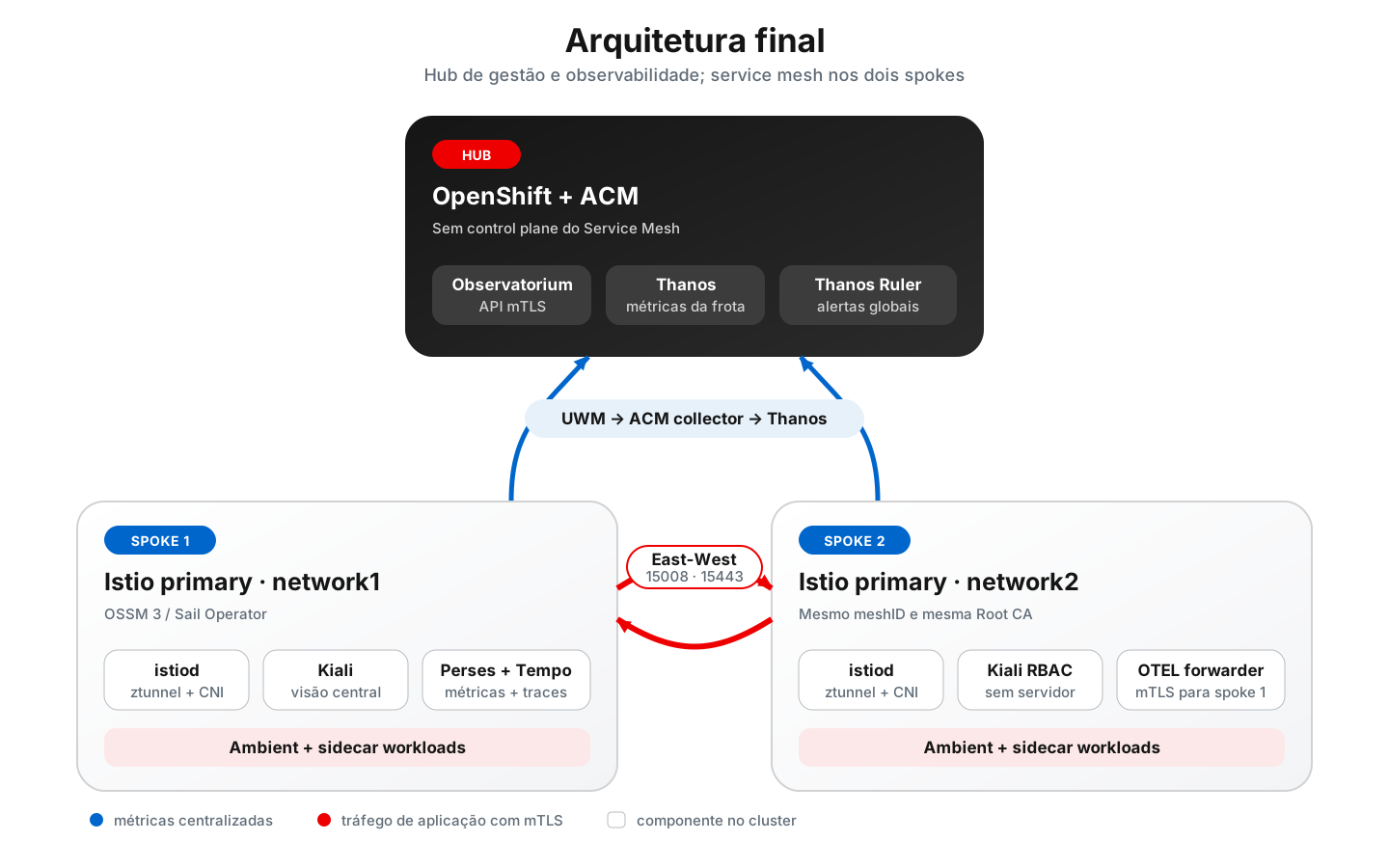
The hub manages the fleet and telemetry. Control plane and workloads stay on the spokes.
Architecture decisions
Some choices need to stay fixed for the whole lab. If you change them mid-way, the rest of this text stops matching the cluster:
| Decision | Example value | Why it matters |
|---|---|---|
| Mesh ID | mesh1 | Identifies the same mesh on both clusters. |
| Cluster 1 | spoke | Must match in Istio, ZTunnel, Kiali, ACM, and remote credentials. |
| Cluster 2 | spoke-two | Same consistency rule as cluster 1. |
| Network 1 | network1 | Lets Istio know when it needs an East-West gateway. |
| Network 2 | network2 | Must differ from network 1 when there is no direct pod-to-pod connectivity. |
| Root CA | Shared | Establishes mTLS trust between the clusters. |
| Intermediate CA | One per cluster | Avoids reusing the intermediate key across operational domains. |
| Kiali | Spoke 1 only | Spoke 2 gets only ServiceAccount, RBAC, and remote auth resources. |
| Hub | No OSSM | The hub stays dedicated to management and observability. |
In the end it is multi-primary, multi-network, and single-mesh: each spoke has its own istiod, but both use the same meshID and the same Root CA.
Prerequisites
You need:
- Three reachable OpenShift clusters.
- OpenShift 4.14 or later; also validate the minimum version required by the OSSM available in the catalog.
- Access to the
redhat-operatorscatalog. oc,openssl,jq,curl, andistioctl.istioctlat the same Istio version configured in OSSM.- External LoadBalancers that can expose ports
15008and15443between the spoke networks. - S3-compatible storage for Thanos and Tempo.
MinIO with emptyDir, a weak password, and an unpinned image is fine in the lab. In production: persistent storage, pinned tags, managed credentials, and backups. No drama.
Kubeconfig, tokens, private keys, and passwords stay out of Git. Temporary file with tight permissions, use it, delete it.
Contexts and variables
Give the contexts clear names before you start. I have already applied a resource to the wrong cluster; that is not the kind of mistake you want to repeat:
oc config get-contexts

oc --context=ossm-kiali-hub whoami --show-server
oc --context=ossm-kiali-spoke whoami --show-server
oc --context=ossm-kiali-spoke-two whoami --show-server
Use a single variable block for the entire deployment:
export HUB_CONTEXT="ossm-kiali-hub"
export SPOKE_CONTEXT="ossm-kiali-spoke"
export SPOKE_TWO_CONTEXT="ossm-kiali-spoke-two"

export SPOKE_CLUSTER_NAME="spoke"
export SPOKE_TWO_CLUSTER_NAME="spoke-two"

export ISTIO_VERSION="1.30.1"
export MESH_ID="mesh1"
export SPOKE_NETWORK="network1"
export SPOKE_TWO_NETWORK="network2"

export KIALI_NAMESPACE="istio-system"
export TEMPO_NAMESPACE="tempo"
export TEMPO_STACK_NAME="istio"
export TEMPO_TENANT="${MESH_ID}"
Do not pick an Istio version only because it appears here. After installing the Operator, check the versions accepted by the CRD:
oc --context="${SPOKE_CONTEXT}" get crd istios.sailoperator.io \
  -o jsonpath='{.spec.versions[0].schema.openAPIV3Schema.properties.spec.properties.version.enum}{"\n"}'
Part 1: hub, first spoke, and observability
1. Install ACM on the hub
In the lab, picking the latest channel saves time. In production, pin the channel your change process approved:
ACM_CHANNEL="$(
  oc --context="${HUB_CONTEXT}" get packagemanifest advanced-cluster-management \
    -n openshift-marketplace \
    -o jsonpath='{.status.channels[*].name}' |
    tr ' ' '\n' |
    sort -V |
    tail -1
)"

printf 'ACM channel: %s\n' "${ACM_CHANNEL}"
Create the namespace, the OperatorGroup, and the Subscription:
oc --context="${HUB_CONTEXT}" create namespace open-cluster-management \
  --dry-run=client -o yaml |
  oc --context="${HUB_CONTEXT}" apply -f -

oc --context="${HUB_CONTEXT}" apply -f - <<EOF
apiVersion: operators.coreos.com/v1
kind: OperatorGroup
metadata:
  name: open-cluster-management
  namespace: open-cluster-management
spec:
  targetNamespaces:
    - open-cluster-management
---
apiVersion: operators.coreos.com/v1alpha1
kind: Subscription
metadata:
  name: acm-operator-subscription
  namespace: open-cluster-management
spec:
  channel: ${ACM_CHANNEL}
  installPlanApproval: Automatic
  name: advanced-cluster-management
  source: redhat-operators
  sourceNamespace: openshift-marketplace
EOF
Wait for the Operator CRD and webhook before creating the MultiClusterHub. Creating the CR too early usually gets rejected by the admission webhook:
oc --context="${HUB_CONTEXT}" wait \
  crd/multiclusterhubs.operator.open-cluster-management.io \
  --for=condition=Established \
  --timeout=300s

oc --context="${HUB_CONTEXT}" wait pod \
  -l name=multiclusterhub-operator \
  -n open-cluster-management \
  --for=condition=Ready \
  --timeout=300s

oc --context="${HUB_CONTEXT}" apply -f - <<'EOF'
apiVersion: operator.open-cluster-management.io/v1
kind: MultiClusterHub
metadata:
  name: multiclusterhub
  namespace: open-cluster-management
spec: {}
EOF
Validate completion:
oc --context="${HUB_CONTEXT}" get multiclusterhub multiclusterhub \
  -n open-cluster-management \
  -o jsonpath='{.status.phase}{"\n"}'
The expected value is Running.
2. Enable ACM Observability
MultiClusterObservability builds the pipeline: metrics from managed clusters land in Thanos. You need an S3-compatible backend.
In the lab, MinIO on the hub itself is enough. In production, switch to real object storage. The Secret ACM consumes looks like this:
apiVersion: v1
kind: Secret
metadata:
  name: thanos-object-storage
  namespace: open-cluster-management-observability
type: Opaque
stringData:
  thanos.yaml: |
    type: s3
    config:
      bucket: thanos
      endpoint: s3.example.internal
      insecure: false
      access_key: ${THANOS_ACCESS_KEY}
      secret_key: ${THANOS_SECRET_KEY}
Create the MultiClusterObservability referencing that Secret:
apiVersion: observability.open-cluster-management.io/v1beta2
kind: MultiClusterObservability
metadata:
  name: observability
spec:
  observabilityAddonSpec: {}
  storageConfig:
    metricObjectStorage:
      name: thanos-object-storage
      key: thanos.yaml
  advanced:
    retentionConfig:
      retentionResolutionRaw: 14d
      retentionResolution5m: 14d
      retentionResolution1h: 14d
Confirm the Ready condition is true and the Observatorium route exists:
oc --context="${HUB_CONTEXT}" wait mco/observability \
  --for=condition=Ready \
  --timeout=900s

oc --context="${HUB_CONTEXT}" get route observatorium-api \
  -n open-cluster-management-observability \
  -o jsonpath='https://{.spec.host}/api/metrics/v1/default{"\n"}'
3. Allow Istio metrics
ACM does not ship every series found in User Workload Monitoring. The metrics must appear in observability-metrics-custom-allowlist.
Start with the set Kiali uses:
apiVersion: v1
kind: ConfigMap
metadata:
  name: observability-metrics-custom-allowlist
  namespace: open-cluster-management-observability
data:
  uwl_metrics_list.yaml: |
    names:
    - istio_requests_total
    - istio_request_bytes_bucket
    - istio_request_bytes_count
    - istio_request_bytes_sum
    - istio_request_duration_milliseconds_bucket
    - istio_request_duration_milliseconds_count
    - istio_request_duration_milliseconds_sum
    - istio_response_bytes_bucket
    - istio_response_bytes_count
    - istio_response_bytes_sum
    - istio_tcp_connections_closed_total
    - istio_tcp_connections_opened_total
    - istio_tcp_received_bytes_total
    - istio_tcp_sent_bytes_total
    - pilot_proxy_convergence_time_sum
    - pilot_proxy_convergence_time_count
    - pilot_services
    - pilot_xds
    - pilot_xds_pushes
Do not overwrite the allowlist with a shorter list. Merge. Someone on the other team will thank you later.
4. Import the first spoke
On the hub, create the ManagedCluster and the KlusterletAddonConfig:
oc --context="${HUB_CONTEXT}" create namespace "${SPOKE_CLUSTER_NAME}" \
  --dry-run=client -o yaml |
  oc --context="${HUB_CONTEXT}" apply -f -

oc --context="${HUB_CONTEXT}" apply -f - <<EOF
apiVersion: cluster.open-cluster-management.io/v1
kind: ManagedCluster
metadata:
  name: ${SPOKE_CLUSTER_NAME}
  labels:
    cloud: auto-detect
    vendor: auto-detect
spec:
  hubAcceptsClient: true
---
apiVersion: agent.open-cluster-management.io/v1
kind: KlusterletAddonConfig
metadata:
  name: ${SPOKE_CLUSTER_NAME}
  namespace: ${SPOKE_CLUSTER_NAME}
spec:
  applicationManager:
    enabled: true
  certPolicyController:
    enabled: true
  policyController:
    enabled: true
  searchCollector:
    enabled: true
EOF
For auto-import, generate a minimal kubeconfig in a temporary file:
SPOKE_KUBECONFIG="$(mktemp)"
chmod 600 "${SPOKE_KUBECONFIG}"
trap 'rm -f "${SPOKE_KUBECONFIG}"' EXIT

oc config view \
  --context="${SPOKE_CONTEXT}" \
  --minify \
  --flatten > "${SPOKE_KUBECONFIG}"

oc --context="${HUB_CONTEXT}" create secret generic auto-import-secret \
  -n "${SPOKE_CLUSTER_NAME}" \
  --from-file="kubeconfig=${SPOKE_KUBECONFIG}"

rm -f "${SPOKE_KUBECONFIG}"
trap - EXIT
ACM consumes and removes that Secret after installing the klusterlet. Wait until both conditions are true:
oc --context="${HUB_CONTEXT}" get managedcluster "${SPOKE_CLUSTER_NAME}" \
  -o jsonpath='{range .status.conditions[*]}{.type}={.status}{"\n"}{end}'
Look for:
ManagedClusterJoined=True
ManagedClusterConditionAvailable=True
5. Install OSSM 3 on the spoke
Enable User Workload Monitoring without wiping what is already there. If the ConfigMap is not there yet:
oc --context="${SPOKE_CONTEXT}" create configmap cluster-monitoring-config \
  -n openshift-monitoring \
  --from-literal='config.yaml=enableUserWorkload: true'
If it already exists, read it, merge, and reapply. Blind replacement is how you delete someone else’s scrape.
Install the Operator:
apiVersion: operators.coreos.com/v1alpha1
kind: Subscription
metadata:
  name: openshift-service-mesh-operator
  namespace: openshift-operators
spec:
  channel: stable
  installPlanApproval: Automatic
  name: servicemeshoperator3
  source: redhat-operators
  sourceNamespace: openshift-marketplace
Create the required namespaces:
for namespace in istio-system istio-cni ztunnel; do
  oc --context="${SPOKE_CONTEXT}" create namespace "${namespace}" \
    --dry-run=client -o yaml |
    oc --context="${SPOKE_CONTEXT}" apply -f -
done

oc --context="${SPOKE_CONTEXT}" label namespace ztunnel \
  istio-discovery=enabled \
  --overwrite
Root CA and Intermediate CA
Create a Root CA exclusive to the mesh and an Intermediate CA for the spoke. The final tree should look like:
istio-certs/
├── root-cert.pem
├── root-key.pem
├── spoke/
│   ├── ca-cert.pem
│   ├── ca-key.pem
│   ├── cert-chain.pem
│   └── root-cert.pem
└── spoke-two/
    ├── ca-cert.pem
    ├── ca-key.pem
    ├── cert-chain.pem
    └── root-cert.pem
Both Intermediate CAs must come from the same Root CA. Keep the root outside /tmp, tighten permissions, and do not put this in the repository:
chmod 600 istio-certs/root-key.pem
chmod 600 istio-certs/spoke/ca-key.pem
Load the first cluster’s material into the cacerts Secret:
oc --context="${SPOKE_CONTEXT}" create secret generic cacerts \
  -n istio-system \
  --from-file=ca-cert.pem=istio-certs/spoke/ca-cert.pem \
  --from-file=ca-key.pem=istio-certs/spoke/ca-key.pem \
  --from-file=root-cert.pem=istio-certs/spoke/root-cert.pem \
  --from-file=cert-chain.pem=istio-certs/spoke/cert-chain.pem
If you automate this, treat PKI as its own piece: validity, rotation, who can access the key, and how to recover. Do that before you open production traffic.
IstioCNI, Istio, and ZTunnel
The openshift-ambient profile leaves the cluster ready for ambient and sidecar:
apiVersion: sailoperator.io/v1
kind: IstioCNI
metadata:
  name: default
spec:
  namespace: istio-cni
  profile: openshift-ambient
  version: v1.30.1
---
apiVersion: sailoperator.io/v1
kind: Istio
metadata:
  name: default
spec:
  namespace: istio-system
  profile: openshift-ambient
  updateStrategy:
    type: InPlace
  values:
    global:
      meshID: mesh1
    meshConfig:
      discoverySelectors:
        - matchLabels:
            istio-discovery: enabled
    pilot:
      trustedZtunnelNamespace: ztunnel
  version: v1.30.1
---
apiVersion: sailoperator.io/v1
kind: ZTunnel
metadata:
  name: default
spec:
  namespace: ztunnel
  version: v1.30.1
Replace v1.30.1 and mesh1 with the values validated in your environment. Wait for each CR before continuing:
oc --context="${SPOKE_CONTEXT}" wait istiocni/default \
  --for=condition=Ready \
  --timeout=300s

oc --context="${SPOKE_CONTEXT}" wait istio/default \
  --for=condition=Ready \
  --timeout=300s

oc --context="${SPOKE_CONTEXT}" wait ztunnel/default \
  --for=condition=Ready \
  --timeout=300s
6. Collect data plane metrics
Create a ServiceMonitor for istiod, a PodMonitor for ztunnel, and a PodMonitor in every namespace that has sidecars or waypoints.
With discoverySelector on the Istio CR, every mesh namespace needs istio-discovery=enabled. Sidecar or ambient alone is not enough: the control plane ignores the namespace.
For istiod:
apiVersion: monitoring.coreos.com/v1
kind: ServiceMonitor
metadata:
  name: istiod-monitor
  namespace: istio-system
spec:
  selector:
    matchLabels:
      istio: pilot
  endpoints:
    - port: http-monitoring
      interval: 30s
For proxies and waypoints, the PodMonitor must select the istio-proxy container, use /stats/prometheus, and preserve the namespace, app, version, and mesh_id labels. On OpenShift User Workload Monitoring, create that resource in the same namespace as the workloads.
7. Install Kiali and point it at the hub
Kiali on the spoke queries Observatorium over mTLS. First get from the hub:
- Observatorium URL.
- Authorized client certificate and key.
- CA that signed the route certificate.
Use protected temporary files:
CERT_DIR="$(mktemp -d)"
chmod 700 "${CERT_DIR}"
trap 'rm -rf "${CERT_DIR}"' EXIT

export OBSERVATORIUM_URL="$(
  oc --context="${HUB_CONTEXT}" get route observatorium-api \
    -n open-cluster-management-observability \
    -o jsonpath='https://{.spec.host}/api/metrics/v1/default'
)"

oc --context="${HUB_CONTEXT}" get secret observability-grafana-certs \
  -n open-cluster-management-observability \
  -o jsonpath='{.data.tls\.crt}' |
  base64 -d > "${CERT_DIR}/tls.crt"

oc --context="${HUB_CONTEXT}" get secret observability-grafana-certs \
  -n open-cluster-management-observability \
  -o jsonpath='{.data.tls\.key}' |
  base64 -d > "${CERT_DIR}/tls.key"

chmod 600 "${CERT_DIR}/tls.key"
Discover which CA signed the route instead of assuming the Secret name:
OBSERVATORIUM_HOST="$(
  oc --context="${HUB_CONTEXT}" get route observatorium-api \
    -n open-cluster-management-observability \
    -o jsonpath='{.spec.host}'
)"

openssl s_client \
  -connect "${OBSERVATORIUM_HOST}:443" \
  -servername "${OBSERVATORIUM_HOST}" \
  -showcerts </dev/null 2>/dev/null |
  openssl x509 -noout -issuer
After exporting the correct CA to ${CERT_DIR}/server-ca.crt, create the resources on the spoke:
oc --context="${SPOKE_CONTEXT}" create secret generic acm-observability-certs \
  -n "${KIALI_NAMESPACE}" \
  --from-file=tls.crt="${CERT_DIR}/tls.crt" \
  --from-file=tls.key="${CERT_DIR}/tls.key"

oc --context="${SPOKE_CONTEXT}" create configmap kiali-cabundle \
  -n "${KIALI_NAMESPACE}" \
  --from-file=additional-ca-bundle.pem="${CERT_DIR}/server-ca.crt"

rm -rf "${CERT_DIR}"
trap - EXIT
Install the Kiali Operator and create the CR:
apiVersion: kiali.io/v1alpha1
kind: Kiali
metadata:
  name: kiali
  namespace: istio-system
spec:
  auth:
    strategy: openshift
  deployment:
    cluster_wide_access: true
    instance_name: kiali
    namespace: istio-system
    replicas: 1
  external_services:
    grafana:
      enabled: false
    prometheus:
      auth:
        cert_file: secret:acm-observability-certs:tls.crt
        key_file: secret:acm-observability-certs:tls.key
        type: none
        use_kiali_token: false
      thanos_proxy:
        enabled: true
        retention_period: 14d
        scrape_interval: 5m
      url: https://observatorium.example/api/metrics/v1/default
  version: default
Those five minutes in scrape_interval come from ACM, not from the local UWM scrape. That is why the Kiali graph sometimes takes 5 to 15 minutes to show new traffic. I have restarted things for no reason because of that.
Finish with OSSMConsole to integrate the UI into the OpenShift console:
apiVersion: kiali.io/v1alpha1
kind: OSSMConsole
metadata:
  name: ossmconsole
  namespace: istio-system
spec: {}
8. Validate ambient and sidecar workloads
Use two demo namespaces:
oc --context="${SPOKE_CONTEXT}" create namespace ambient-demo \
  --dry-run=client -o yaml |
  oc --context="${SPOKE_CONTEXT}" apply -f -

oc --context="${SPOKE_CONTEXT}" label namespace ambient-demo \
  istio.io/dataplane-mode=ambient \
  istio-discovery=enabled \
  --overwrite

oc --context="${SPOKE_CONTEXT}" create namespace bookinfo \
  --dry-run=client -o yaml |
  oc --context="${SPOKE_CONTEXT}" apply -f -

oc --context="${SPOKE_CONTEXT}" label namespace bookinfo \
  istio-injection=enabled \
  istio-discovery=enabled \
  --overwrite
In the ambient namespace, ztunnel provides L4 mTLS without injecting a sidecar. To get HTTP metrics, latency, and response codes in Kiali, add a waypoint:
apiVersion: gateway.networking.k8s.io/v1
kind: Gateway
metadata:
  name: waypoint
  namespace: ambient-demo
  labels:
    istio.io/waypoint-for: service
spec:
  gatewayClassName: istio-waypoint
  listeners:
    - name: mesh
      port: 15008
      protocol: HBONE
Then:
oc --context="${SPOKE_CONTEXT}" wait gateway/waypoint \
  -n ambient-demo \
  --for=condition=Programmed=True \
  --timeout=120s

oc --context="${SPOKE_CONTEXT}" label namespace ambient-demo \
  istio.io/use-waypoint=waypoint \
  --overwrite
Do not be surprised by two edges in Kiali for ambient traffic with a waypoint: one from ztunnel (L4), another from the waypoint (L7).
Part 2: spokes in a multi-primary mesh
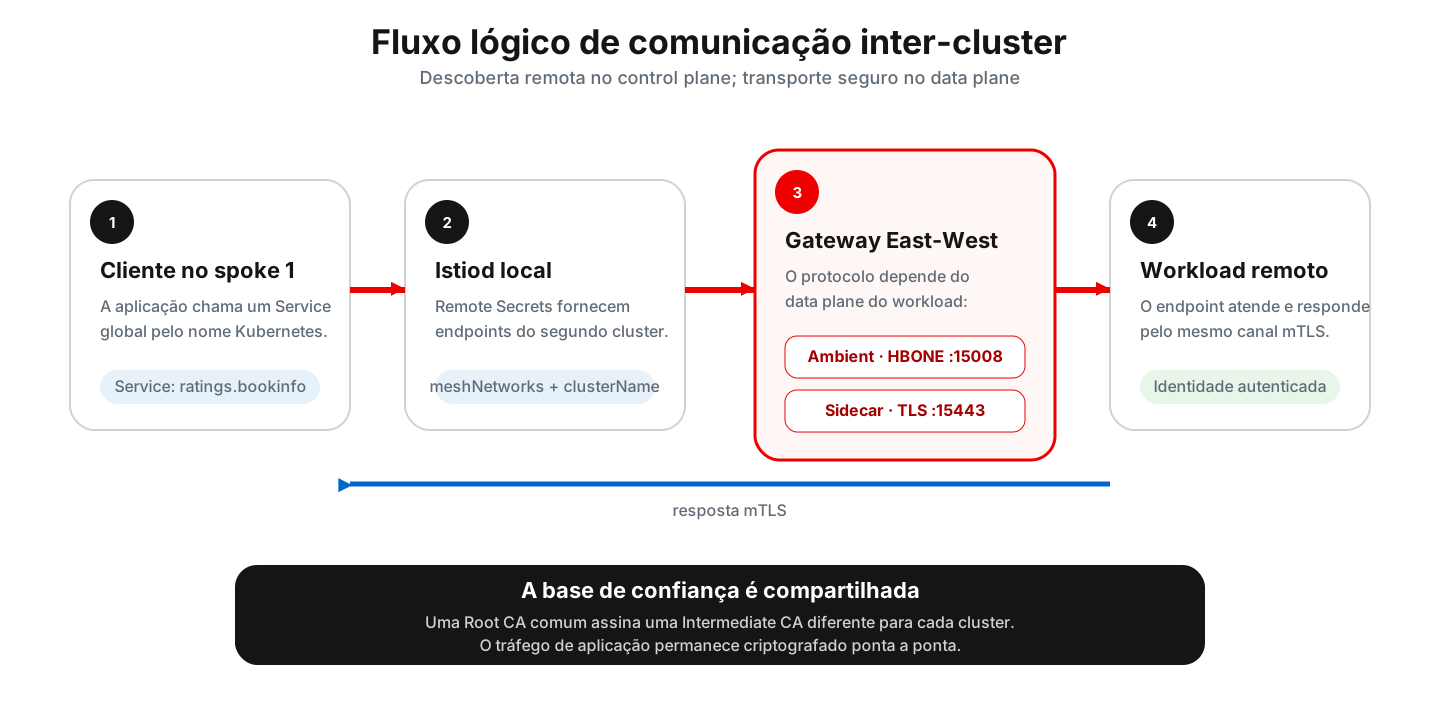
Remote Secret resolves endpoints. The gateway carries the traffic. Those are different jobs; mixing them up is a recipe for long debugging sessions.
1. Import and prepare the second spoke
Repeat the ACM import using ${SPOKE_TWO_CLUSTER_NAME} and ${SPOKE_TWO_CONTEXT}. Install OSSM 3, enable UWM, and create the same infrastructure namespaces.
The second spoke’s Intermediate CA must be signed by the same Root CA as the first:
oc --context="${SPOKE_TWO_CONTEXT}" create secret generic cacerts \
  -n istio-system \
  --from-file=ca-cert.pem=istio-certs/spoke-two/ca-cert.pem \
  --from-file=ca-key.pem=istio-certs/spoke-two/ca-key.pem \
  --from-file=root-cert.pem=istio-certs/spoke-two/root-cert.pem \
  --from-file=cert-chain.pem=istio-certs/spoke-two/cert-chain.pem
The label on istio-system does two things: marks the local network and lets the Gateway API controller process gateways in that namespace.
oc --context="${SPOKE_TWO_CONTEXT}" label namespace istio-system \
  "topology.istio.io/network=${SPOKE_TWO_NETWORK}" \
  istio-discovery=enabled \
  --overwrite
2. Set identity and network on both control planes
The second Istio primary needs these values:
apiVersion: sailoperator.io/v1
kind: Istio
metadata:
  name: default
spec:
  namespace: istio-system
  profile: openshift-ambient
  values:
    global:
      meshID: mesh1
      multiCluster:
        clusterName: spoke-two
      network: network2
    meshConfig:
      discoverySelectors:
        - matchLabels:
            istio-discovery: enabled
    pilot:
      trustedZtunnelNamespace: ztunnel
      env:
        AMBIENT_ENABLE_MULTI_NETWORK: "true"
  version: v1.30.1
ZTunnel must repeat the same clusterName and network:
apiVersion: sailoperator.io/v1
kind: ZTunnel
metadata:
  name: default
spec:
  namespace: ztunnel
  version: v1.30.1
  values:
    ztunnel:
      multiCluster:
        clusterName: spoke-two
      network: network2
Update the first spoke the same way:
oc --context="${SPOKE_CONTEXT}" label namespace istio-system \
  "topology.istio.io/network=${SPOKE_NETWORK}" \
  istio-discovery=enabled \
  --overwrite

oc --context="${SPOKE_CONTEXT}" patch istio default --type=merge -p "{
  \"spec\": {
    \"values\": {
      \"global\": {
        \"multiCluster\": {\"clusterName\": \"${SPOKE_CLUSTER_NAME}\"},
        \"network\": \"${SPOKE_NETWORK}\"
      },
      \"pilot\": {
        \"env\": {
          \"AMBIENT_ENABLE_MULTI_NETWORK\": \"true\"
        }
      }
    }
  }
}"

oc --context="${SPOKE_CONTEXT}" patch ztunnel default --type=merge -p "{
  \"spec\": {
    \"values\": {
      \"ztunnel\": {
        \"multiCluster\": {\"clusterName\": \"${SPOKE_CLUSTER_NAME}\"},
        \"network\": \"${SPOKE_NETWORK}\"
      }
    }
  }
}"
Also set spec.kubernetes_config.cluster_name on Kiali to the home cluster name:
oc --context="${SPOKE_CONTEXT}" patch kiali kiali \
  -n "${KIALI_NAMESPACE}" \
  --type=merge \
  -p "{
    \"spec\": {
      \"kubernetes_config\": {
        \"cluster_name\": \"${SPOKE_CLUSTER_NAME}\"
      }
    }
  }"
In the lab, if the API certificate does not validate, spec.auth.openshift.insecure_skip_verify_tls: true kills the OAuth loop. In production, fix the trust chain. That flag is a shortcut, not architecture.
3. Create the East-West gateways
Ambient and sidecar use different protocols:
| Data plane | Port | GatewayClass | TLS |
|---|---|---|---|
| Ambient | 15008 | istio-east-west | HBONE with ISTIO_MUTUAL |
| Sidecar | 15443 | istio | TLS passthrough |
Ambient gateway, applied on both clusters with the matching network label:
apiVersion: gateway.networking.k8s.io/v1
kind: Gateway
metadata:
  name: istio-eastwestgateway
  namespace: istio-system
  labels:
    topology.istio.io/network: network1
spec:
  gatewayClassName: istio-east-west
  listeners:
    - name: mesh
      port: 15008
      protocol: HBONE
      tls:
        mode: Terminate
        options:
          gateway.istio.io/tls-terminate-mode: ISTIO_MUTUAL
Sidecar gateway:
apiVersion: gateway.networking.k8s.io/v1
kind: Gateway
metadata:
  name: istio-eastwestgateway-sidecar
  namespace: istio-system
  labels:
    topology.istio.io/network: network1
spec:
  gatewayClassName: istio
  listeners:
    - name: tls
      port: 15443
      protocol: TLS
      tls:
        mode: Passthrough
      allowedRoutes:
        namespaces:
          from: Same
On spoke 2, replace network1 with network2. Wait for Programmed=True and recover the addresses of the Services created by the controller. Depending on the provider, the field may be ip or hostname; handle both cases in automation.
4. Configure meshNetworks
Each istiod needs to know:
- The registry associated with each network.
- The HBONE gateway address.
- The sidecar gateway address.
The logical snippet is:
global:
  meshNetworks:
    network1:
      endpoints:
        - fromRegistry: spoke
      gateways:
        - address: ${SPOKE_HBONE_ADDRESS}
          port: 15008
        - address: ${SPOKE_SIDECAR_ADDRESS}
          port: 15443
    network2:
      endpoints:
        - fromRegistry: spoke-two
      gateways:
        - address: ${SPOKE_TWO_HBONE_ADDRESS}
          port: 15008
        - address: ${SPOKE_TWO_SIDECAR_ADDRESS}
          port: 15443
Both Istio CRs need to see the same meshNetworks. If each control plane only knows its own network, the remote endpoint has no route.
5. Exchange Remote Secrets
Remote Secrets only let each istiod read Services and endpoints on the other API server. Application traffic does not go through them.
Create the ServiceAccount with cluster-reader in the correct namespace:
for context in "${SPOKE_CONTEXT}" "${SPOKE_TWO_CONTEXT}"; do
  oc --context="${context}" create serviceaccount istio-reader-service-account \
    -n istio-system \
    --dry-run=client -o yaml |
    oc --context="${context}" apply -f -

  oc --context="${context}" adm policy add-cluster-role-to-user cluster-reader \
    -z istio-reader-service-account \
    -n istio-system
done
Generate and apply the Secrets:
istioctl create-remote-secret \
  --context="${SPOKE_TWO_CONTEXT}" \
  --name="${SPOKE_TWO_CLUSTER_NAME}" \
  -n istio-system \
  --create-service-account=false |
  oc --context="${SPOKE_CONTEXT}" apply -f -

istioctl create-remote-secret \
  --context="${SPOKE_CONTEXT}" \
  --name="${SPOKE_CLUSTER_NAME}" \
  -n istio-system \
  --create-service-account=false |
  oc --context="${SPOKE_TWO_CONTEXT}" apply -f -
Do not forget -n istio-system. Without it, istioctl looks for the ServiceAccount in default and you lose half an hour.
Validate:
oc --context="${SPOKE_CONTEXT}" get secrets \
  -n istio-system \
  -l istio/multiCluster=true

oc --context="${SPOKE_TWO_CONTEXT}" get secrets \
  -n istio-system \
  -l istio/multiCluster=true
6. Give Kiali access to the second cluster
On spoke 2, install the Kiali Operator and create a CR with remote resources only:
apiVersion: kiali.io/v1alpha1
kind: Kiali
metadata:
  name: kiali
  namespace: istio-system
spec:
  auth:
    openshift:
      redirect_uris:
        - https://kiali.example/api/auth/callback/spoke-two
  deployment:
    namespace: istio-system
    remote_cluster_resources_only: true
That creates the ServiceAccount and RBAC you need without running a second Kiali server.
On spoke 1, create kiali-multi-cluster-secret. Each key must use exactly the cluster name:
kiali-multi-cluster-secret
└── data
    └── spoke-two: <kubeconfig restrito à ServiceAccount do Kiali>
Add the label so the Operator reconciles automatically:
oc --context="${SPOKE_CONTEXT}" label secret kiali-multi-cluster-secret \
  -n "${KIALI_NAMESPACE}" \
  kiali.io/kiali-multi-cluster-secret=true \
  --overwrite
Use a dedicated ServiceAccount, minimal RBAC, and rotation. An admin kubeconfig here is expensive laziness.
7. Make the Services global
A Service with the same name on both clusters stays local until it gets:
oc --context="${SPOKE_CONTEXT}" label service ratings \
  -n bookinfo \
  istio.io/global=true \
  --overwrite

oc --context="${SPOKE_TWO_CONTEXT}" label service ratings \
  -n bookinfo \
  istio.io/global=true \
  --overwrite
With local and remote endpoints, Istio load-balances across clusters. In the demo I leave ratings-v1 on spoke 1 and ratings-v2 on spoke 2: it is obvious in the graph when traffic crosses.
Part 3: Perses and Tempo
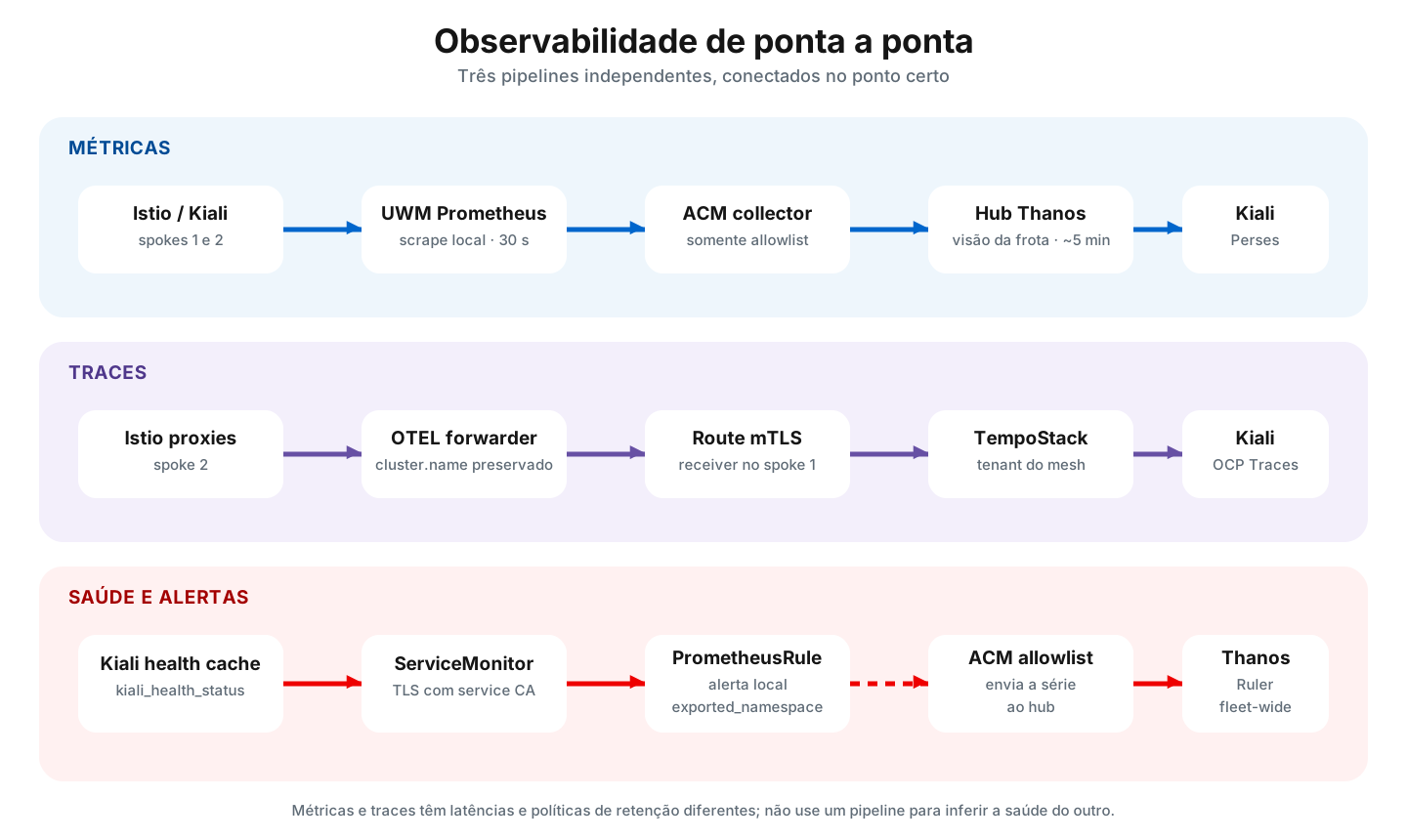
Centralizing metrics does not centralize traces by itself. They are different pipelines, each with its own auth, transport, and retention.
1. Perses dashboards on ACM Thanos
Install the Cluster Observability Operator on spoke 1 and create the monitoring UIPlugin. Perses runs on that cluster, but its datasource points at Observatorium on the hub.
The datasource needs:
- Observatorium URL.
- Client certificate and key.
- Hub route CA.
- A proxy configured for mTLS.
The topology is:
Perses no spoke 1
  └── PersesDatasource acm-thanos
      └── proxy mTLS
          └── Observatorium no hub
              └── Thanos com séries dos dois spokes
Create separate dashboards to reduce coupling:
- Mesh overview: request rate, errors, and latency per cluster.
- Workload: traffic, CPU, and memory filtered by cluster, namespace, and workload.
- ZTunnel: connections, bytes, and errors from the ambient data plane.
In Kiali, enable Perses with a merge that changes only spec.external_services.perses. Do not replace all of external_services, or you will remove Prometheus and Tempo.
Use url_format: openshift for console integration. When Perses is protected by OpenShift OAuth, do not set an arbitrary internal_url to bypass authentication.
2. Multi-cluster traces with Tempo
Install:
- Tempo Operator and OpenTelemetry Operator on spoke 1.
- OpenTelemetry Operator on spoke 2.
- A
TempoStackon spoke 1 with S3 storage. - A local collector on spoke 1.
- A remote receiver on spoke 1, exposed by a passthrough Route and protected with mTLS.
- A forwarder on spoke 2.
The spoke 2 flow is:
Istio proxies
  → OTEL forwarder
  → Route passthrough mTLS
  → OTEL receiver no spoke 1
  → Tempo gateway
  → object storage
On both collectors, set k8s.cluster.name by hand. Without that, after a trace crosses clusters you will not know where the span came from.
processors:
  resource/cluster:
    attributes:
      - key: k8s.cluster.name
        action: upsert
        value: spoke-two
Configure Istio on each cluster to send OTLP to the local collector:
meshConfig:
  defaultProviders:
    tracing:
      - otel
  extensionProviders:
    - name: otel
      opentelemetry:
        port: 4317
        service: otel-collector.istio-system.svc.cluster.local
  enableTracing: true
Tune sampling to cost and volume. 100% is great in the lab. In production, the bill arrives fast.
Enable the distributed tracing plugin in the console and merge only spec.external_services.tracing on Kiali. To validate the origin:
{ resource.k8s.cluster.name = "spoke-two" }
An inter-cluster Bookinfo trace should show reviews spans on the first spoke and ratings on the second.
Part 4: alerts with Kiali health
Kiali computes health for applications, Services, workloads, and namespaces. When you enable export, each entity becomes a kiali_health_status series:
| Value | State |
|---|---|
0 | Healthy |
1 | Not Ready |
2 | Degraded |
3 | Failure |
1. Export the metric
Merge into the CR:
oc --context="${SPOKE_CONTEXT}" patch kiali kiali \
  -n "${KIALI_NAMESPACE}" \
  --type=merge \
  -p '{
    "spec": {
      "server": {
        "observability": {
          "metrics": {
            "enabled": true,
            "health_status": {
              "enabled": true
            }
          }
        }
      }
    }
  }'
The metrics listener comes up if general metrics or health_status are enabled. I set both to true in the CR so I do not depend on defaults.
2. Scrape with TLS
On OpenShift, the Kiali endpoint uses a service-serving certificate. Wait for the kiali-cabundle-openshift ConfigMap to get service-ca.crt and reference it in the ServiceMonitor:
apiVersion: monitoring.coreos.com/v1
kind: ServiceMonitor
metadata:
  name: kiali
  namespace: istio-system
spec:
  selector:
    matchLabels:
      app.kubernetes.io/name: kiali
  namespaceSelector:
    matchNames:
      - istio-system
  endpoints:
    - port: tcp-metrics
      interval: 30s
      scheme: https
      tlsConfig:
        ca:
          configMap:
            name: kiali-cabundle-openshift
            key: service-ca.crt
        serverName: kiali.istio-system.svc
Avoid tlsConfig.caFile. UWM often blocks loose filesystem access in the ServiceMonitor. ConfigMap works.
The health cache updates in cycles; wait up to five minutes before concluding the series never appeared:
kiali_health_status
3. Create local recording rules and alerts
UWM replaces the Prometheus namespace label with the namespace of the monitor/rule itself. The original mesh namespace becomes exported_namespace. Use that label in queries.
{% raw %}
apiVersion: monitoring.coreos.com/v1
kind: PrometheusRule
metadata:
  name: kiali-health-status
  namespace: istio-system
  labels:
    openshift.io/prometheus-rule-evaluation-scope: leaf-prometheus
spec:
  groups:
    - name: kiali.health.recording
      rules:
        - record: kiali:health_status:max
          expr: |
            max by (cluster, exported_namespace, health_type, name) (
              kiali_health_status
            )
        - record: kiali:health_status:namespace_max
          expr: |
            max by (cluster, exported_namespace, name) (
              kiali_health_status{health_type="namespace"}
            )
    - name: kiali.health.alerts
      rules:
        - alert: KialiHealthFailure
          expr: |
            kiali:health_status:max{
              health_type=~"app|service|workload"
            } == 3
          for: 5m
          labels:
            severity: critical
          annotations:
            summary: >-
              {{ $labels.health_type }} {{ $labels.name }} in
              {{ $labels.exported_namespace }} is in Failure
        - alert: KialiHealthDegraded
          expr: |
            kiali:health_status:max{
              health_type=~"app|service|workload"
            } == 2
          for: 10m
          labels:
            severity: warning
          annotations:
            summary: >-
              {{ $labels.health_type }} {{ $labels.name }} in
              {{ $labels.exported_namespace }} is Degraded
{% endraw %}
The max is intentional: with more than one Kiali replica, the worst value wins. Keep cluster in the aggregation, or you mix entities with the same name across clusters.
4. Send health to the hub
Add kiali_health_status to the existing ACM allowlist without deleting previous names:
data:
  uwl_metrics_list.yaml: |
    names:
    - istio_requests_total
    # other existing metrics
    - kiali_health_status
After two scrape cycles, query Thanos on the hub:
oc --context="${HUB_CONTEXT}" get --raw \
  "/api/v1/namespaces/open-cluster-management-observability/services/http:observability-thanos-query-frontend:9090/proxy/api/v1/query?query=kiali_health_status" |
  jq .
For global alerts, thanos-ruler-custom-rules evaluates the raw series. Local recording rules are not forwarded to the hub automatically:
{% raw %}
apiVersion: v1
kind: ConfigMap
metadata:
  name: thanos-ruler-custom-rules
  namespace: open-cluster-management-observability
data:
  custom_rules.yaml: |
    groups:
      - name: kiali.health.hub.alerts
        rules:
          - alert: KialiHubHealthFailure
            expr: |
              max by (cluster, exported_namespace, health_type, name) (
                kiali_health_status{
                  health_type=~"app|service|workload"
                }
              ) == 3
            for: 5m
            labels:
              severity: critical
            annotations:
              summary: >-
                {{ $labels.health_type }} {{ $labels.name }} in
                {{ $labels.exported_namespace }} on
                {{ $labels.cluster }} is in Failure
          - alert: KialiHubHealthDegraded
            expr: |
              max by (cluster, exported_namespace, health_type, name) (
                kiali_health_status{
                  health_type=~"app|service|workload"
                }
              ) == 2
            for: 10m
            labels:
              severity: warning
            annotations:
              summary: >-
                {{ $labels.health_type }} {{ $labels.name }} in
                {{ $labels.exported_namespace }} on
                {{ $labels.cluster }} is Degraded
{% endraw %}
Note the =~ operator in the health_type filter. Using = with the string "app|service|workload" looks for a literal value that does not exist.
Merge into the ConfigMap. If you replace custom_rules.yaml with only the Kiali rule, the other team’s rule disappears. I have seen that happen.
How traffic stays protected
Between clusters, what actually secures the conversation:
- Shared Root CA: both clusters trust the same root.
- Intermediate CA per cluster: each signs with its own intermediate key.
- mTLS between services: identity and encryption on the workload path.
- East-West gateway: HBONE or TLS passthrough, without terminating the app identity outside the mesh model.
Remote Secret is not on the data path. It only authorizes discovery on the remote API server. That is why you want minimal RBAC and its own rotation.
Verification checklist
ACM
oc --context="${HUB_CONTEXT}" get managedclusters
oc --context="${HUB_CONTEXT}" get mco observability
oc --context="${HUB_CONTEXT}" get route observatorium-api \
  -n open-cluster-management-observability
Both spokes should be JOINED=True and AVAILABLE=True.
OSSM
for context in "${SPOKE_CONTEXT}" "${SPOKE_TWO_CONTEXT}"; do
  oc --context="${context}" get istio,istiocni,ztunnel
  oc --context="${context}" get gateway -n istio-system
  oc --context="${context}" get secrets \
    -n istio-system \
    -l istio/multiCluster=true
done
Discovery and traffic
oc --context="${SPOKE_CONTEXT}" get endpointslice \
  -n bookinfo \
  -l kubernetes.io/service-name=ratings \
  -o wide

oc --context="${SPOKE_CONTEXT}" logs \
  -n bookinfo \
  deployment/traffic-gen \
  --tail=20
The EndpointSlice must list the remote cluster. The test that matters: remove the local endpoint in the demo and see if the call still goes through.
Metrics
oc --context="${HUB_CONTEXT}" get --raw \
  "/api/v1/namespaces/open-cluster-management-observability/services/http:observability-thanos-query-frontend:9090/proxy/api/v1/label/__name__/values" |
  jq -r '.data[]' |
  grep -E '^(istio_|kiali_health_status)'
After generating traffic, wait 5 to 15 minutes. ACM is eventual. A missing series on the first refresh is almost never “it is broken.”.
Traces
In the OpenShift Console, open Observe → Traces and use:
{ resource.k8s.cluster.name = "spoke-two" }
Kiali
Check:
- Namespaces from both clusters in the selector.
- Two control planes on the Mesh page.
- Bookinfo graph crossing the spokes.
- Ambient metrics separable by
WaypointandZTunnel. - Links to Perses and Tempo.
Problems that cost the most time
| Symptom | Likely cause | Check |
|---|---|---|
istioctl create-remote-secret cannot find the ServiceAccount | Namespace omitted | Pass -n istio-system. |
ztunnel fails to authenticate to istiod | Different clusterName | Compare Istio and ZTunnel on the same spoke. |
| The Service exists on both clusters but gets no remote traffic | Service not global | Confirm istio.io/global=true on both. |
Gateway Programmed, but no traffic | Incomplete meshNetworks or wrong address | Validate IP/hostname and ports 15008/15443. |
| Kiali sees metrics but not remote resources | Missing Kiali Secret or key with wrong name | The key must be exactly the cluster name. |
| Kiali enters a login loop | Invalid redirect URI or TLS trust | Review remote spoke OAuth and the API chain. |
| Kiali ServiceMonitor creates no target | caFile blocked by UWM | Use tlsConfig.ca.configMap. |
| Health PromQL returns the wrong namespace | UWM rewrote namespace | Query exported_namespace. |
| Perses opens without the right dashboard | Deep-link or variable limitation | Select the dashboard and fill cluster/namespace. |
| Spoke 2 traces look like they come from spoke 1 | Missing resource processor | Set k8s.cluster.name on each cluster’s collector. |
| Graph is slow to appear | ACM interval | Wait two scrape cycles. |
| A patch removes Prometheus, Perses, or Tempo | Whole external_services replaced | Merge only the target key. |
Hardening before production
This text prioritizes getting the lab working. Before you take it to production:
- Pin Operator channels and versions.
- Use external, persistent object storage.
- Replace static credentials with managed, rotatable Secrets.
- Define validity and rotation for the Root and Intermediate CAs.
- Restrict security groups and firewalls to the required ports and sources.
- Use minimal RBAC for Remote Secrets and for Kiali remote access.
- Avoid
insecure_skip_verify_tls. - Set trace sampling and retention based on volume and cost.
- Size Thanos, Tempo, Perses, collectors, and Kiali with load tests.
- Add PodDisruptionBudgets, requests, limits, and availability strategies.
- Merge shared ConfigMaps; never replace them without reading the current state.
- Version manifests without versioning secret material.
Teardown order
If you need to tear the environment down, remove in reverse order:
- Alerts and
kiali_health_statusexport. - Perses and Tempo integrations.
- Demo workloads.
- Kiali multi-cluster access and Remote Secrets.
- East-West gateways and
meshNetworksconfiguration. - OSSM on the second spoke.
- OSSM and Kiali on the first spoke.
- ManagedClusters, ACM Observability, and ACM.
Do not delete kiali-cabundle-openshift by hand: the Operator owns it. If you are only removing Kiali health, leave the Istio metrics on the allowlist. On Thanos Ruler, remove the right group and leave the rest alone.
Conclusion
The trick is not a magic tool. It is not mixing roles:
- ACM manages the fleet and centralized metrics.
- Istio discovers endpoints and carries traffic with identity.
- The gateway joins the networks without merging the clusters.
- Kiali shows config, topology, and telemetry in one place.
- Perses to explore series; Tempo for the request story.
- Prometheus and Thanos Ruler turn health into alerts.
When meshID, clusterName, network, PKI, and labels match, the second cluster stops being “one more panel” and becomes part of the same mesh. When they do not, you come back to this post — usually to the wrong section the first time.