Real-Time Linux: low latency with PREEMPT_RT
Table of contents

Introduction
Real-Time Linux (RTL) is a Linux kernel extension that turns the operating system into a real-time environment. On top of the usual Linux features, it can handle work that needs high predictability and low latency—industrial automation, medical devices, even entertainment systems.
At the end of 2024, the Linux kernel fully absorbed Real-Time Linux (RTL). That was a historic milestone. How did we get here?
The RTL journey
The idea of adding real-time capabilities to Linux goes back to the late 1990s, when the first patches aimed to improve performance and cut kernel latency. Those patches grew into more solid projects such as PREEMPT-RT.
PREEMPT-RT enabled:
- Full preemption: Almost every kernel routine can be interrupted.
- Lower latency: Better predictability for critical execution paths.
After years of community work and support from companies like Red Hat, Intel, and IBM, PREEMPT-RT finally merged into the mainline kernel, consolidating Linux as an RTOS (Real-Time Operating System) platform.
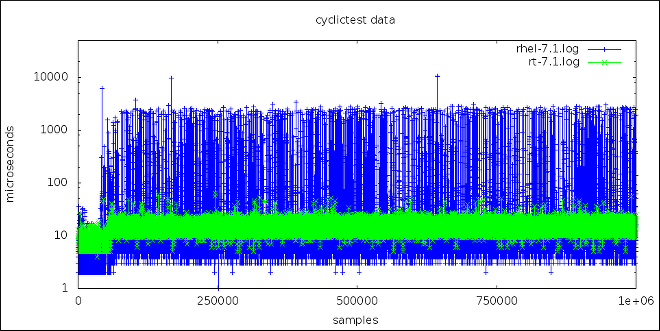
Comparison: RTL workload vs. normal workload
For typical workloads with kernel latency needs in the millisecond (ms) range, the standard Red Hat Enterprise Linux 7 kernel is enough. If your workload needs strict low-latency determinism for core kernel features—interrupt handling and process scheduling in the microsecond (μs) range—the real-time kernel is the better fit.
Preemption models in Linux
Linux preemption models decide how the kernel manages interrupts and tasks. They are chosen at kernel compile time, and the “Fully Preemptible Kernel” is what you need for real-time behavior. The main models:
- No Forced Preemption (Server): Traditional model focused on maximizing throughput. Preemption points appear mainly at system-call returns and interrupts.
- Voluntary Preemption (Desktop): Cuts kernel latency by adding explicit preemption points in the code, at a small cost to throughput.
- Preemptible Kernel (Low-Latency Desktop): Makes almost all kernel code preemptible except critical sections, with implicit preemption points after each preemption disable.
- Preemptible Kernel (Basic RT): Similar to “Low-Latency Desktop”, but with threaded interrupt handlers. Used for testing and debugging.
- Fully Preemptible Kernel (RT): All kernel code is preemptible except selected critical sections. Includes threaded interrupt handlers and mechanisms such as sleeping spinlocks and rt_mutex to keep non-preemptible sections small—this is real-time behavior.
Where can Real-Time Linux be applied?
Use cases vary, but they usually involve critical performance:
- Automotive: Braking systems and engine control.
- Industrial: Robotics and automation.
- Telecommunications: 5G networks that need low latency for packet processing.
- Entertainment: Real-time audio mixing.
- Healthcare: Time-sensitive medical equipment.
Hands-on: testing the PREEMPT-RT kernel
Understanding PREEMPT-RT
PREEMPT-RT is a set of patches for the Linux kernel that turns the OS into a real-time environment. This preemption model cuts latency by replacing conventional synchronization with preemptible variants. It also breaks long critical sections and forces interrupt handlers into threads.
Main PREEMPT-RT features
- Interrupt threading: All interrupts run as schedulable threads, so the system can prioritize and manage real-time tasks.
- Preemptible spinlocks: Replaces standard spinlocks with variants that allow preemption, reducing delays while holding shared resources.
- Priority inheritance: Mutexes that avoid priority inversion so critical tasks get resources when they need them.
- Fragmenting non-preemptible sections: Shortens time spent in critical code by breaking long non-preemptible sections into smaller pieces.
Those features make the Linux kernel highly responsive and suitable for systems that need predictability and low latency—robotics, telecom, medical devices.
Below is an example of how to configure and test a kernel with PREEMPT-RT support. These steps were run on an Ubuntu 22.04 LTS virtual machine.
Steps
1. Get the latest kernel source:
git clone git://git.kernel.org/pub/scm/linux/kernel/git/torvalds/linux.git
cd linux
2. Configure the kernel for PREEMPT-RT:
make menuconfig
Navigate to General Setup / Preemption Model and enable Fully Preemptible Kernel (Real-Time). Save and exit.
Confirm the setting was applied:
grep PREEMPT_RT .config
# Saída esperada: CONFIG_PREEMPT_RT=y
3. Build the kernel:
time make -j$(nproc)
4. Install and reboot:
sudo make modules_install && sudo make install
sudo reboot
Select the new kernel at boot.
5. Confirm the version:
cat /proc/version
# Exemplo de saída:
# Linux version 6.11.0-rtl+ (gcc (Ubuntu 11.4.0) 11.4.0) #1 SMP PREEMPT_RT Fri Sep 20 19:11:35 IST 2024
The kernel is now set up for real-time work. To check how well it behaves, run real-time apps such as audio mixing with JACK or PulseAudio.
How to configure Red Hat Enterprise Linux for Real Time
Red Hat Enterprise Linux for Real Time (RHEL-RT) ships tools and settings tuned for latency-sensitive applications. Steps to set it up and get the most out of it:
1. Prerequisites
- Make sure your Red Hat subscription includes the RHEL for Real Time channel.
- Update your system:
sudo dnf update -y
2. Install the RT kernel
Install the real-time optimized kernel:
sudo dnf install kernel-rt kernel-rt-devel
3. Select the RT kernel in the bootloader
After installing the kernel, set the bootloader to use the RT kernel by default:
grub2-set-default "Red Hat Enterprise Linux (kernel-rt)"
sudo grub2-mkconfig -o /boot/grub2/grub.cfg
sudo reboot
4. Latency tuning
After rebooting into the RT kernel, use tools such as tuna to adjust priorities and CPU affinity:
sudo tuna -t irq -q
sudo tuna -t "[sua aplicação]" -p 99
Configure CPU partitioning to isolate cores for real-time tasks:
echo 1 > /sys/devices/system/cpu/cpu[X]/isolated
5. Diagnostic tools
Use tools such as cyclictest to measure latency:
sudo cyclictest -m -Sp99 -i100 -h300 -q
How did Red Hat implement RTL?
Red Hat contributed heavily to bringing PREEMPT-RT into the mainline kernel. In Red Hat Enterprise Linux for Real Time, several optimizations target:
- Latency: Scheduler and interrupt-handling tweaks.
- Specialized tools: Custom kernel profiles and tools such as
tunafor real-time priority tuning. - Security: Keeping changes from undermining system stability.
Conclusion
Merging Real-Time Linux into the mainline kernel is a turning point for Linux as a general-purpose OS. It can now cover conventional applications and environments that demand very high predictability.
Whether you are a developer exploring Linux in embedded systems or a tech enthusiast, RTL opens doors for innovation in many areas.
References
- Linux Foundation. “Real-Time Linux Documentation.” Available at: https://wiki.linuxfoundation.org/realtime/documentation/start. Accessed: Dec 20, 2024.
- Linux Foundation. “Kernel PREEMPT-RT.” Available at: https://wiki.linuxfoundation.org/realtime/documentation/technical_basics/preemption_models. Accessed: Dec 20, 2024.
- Red Hat. “Red Hat Enterprise Linux for Real Time.” Available at: https://docs.redhat.com/en/documentation/red_hat_enterprise_linux_for_real_time/7/html/installation_guide/chap-why_use_rt_to_optimize_latency#chap-Why_Use_RT_to_Optimize_Latency. Accessed: Dec 20, 2024.
- Kaiwan N Billimoria. “The Linux Kernel is Now an RTOS.” Kaiwan Tech Blog. Available at: https://kaiwantech.wordpress.com/2024/09/21/the-linux-kernel-is-now-an-rtos-with-rtl-being-fully-merged/. Accessed: Dec 20, 2024.